


Our building
Address
Our full address is Alliance Manchester Business School, Booth Street West, Manchester, M15 6PB.
Building opening times
Monday: 08:00 – 20:00
Tuesday: 08:00 – 20:00
Wednesday: 08:00 – 20:00
Thursday: 08:00 – 20:00
Friday: 08:00 – 20:00
Saturday: 09:00 – 17:00
Sunday: 09:00 - 17:00 (trial opening from 5 October 2025)
The building will be closed on Bank Holidays and University closure days.
Comfort room
There is a quiet comfort room located on the 2nd floor (room 2.094j) suitable for expectant or new mothers. The room is also suitable anyone who may need to administer medication.
Please ask Reception for the access code and they will be able to tell you if the room is currently in use.
Finding the room: Walk past the Hive Cafe on the 2nd floor towards the Eddie Davies library and take a left into the cosy campus (room 2.094). Proceed into the adjoined kitchen and the room is 2.094j on the left-hand side.
Fire safety
We conduct a weekly fire alarm test every Friday at 08:30. If the alarm sounds at any other time, you should treat this as a real emergency.
The AMBS buildings alarm system comprises 2 zones, identified below:
- Zone A – covers the ground floor up to and including the 4th floor.
- Zone B – from the 5th floor up to and including the 10th floor.
Depending on which zone the emergency has been detected in, you will hear either an intermittent or a continuous alarm sound.
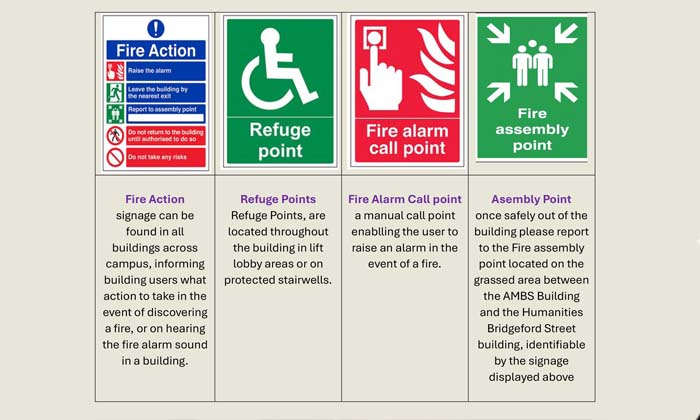
It is recommended you leave the building immediately via your nearest exit and make your way to the front of the building where the assembly point is located.
Safety Signage is displayed in all University buildings across campus:
First aid
In case of injury to yourself or others please contact AMBS Reception on Ext 56303 for assistance (or Security on Ext 69966 after 4pm).
Please refer to the first aid signage displayed within the school. The reception and security team will be able to tell you where the nearest first aid kit is and contact the closest trained first aider for assistance.
Download the SafeZone app for use in the need of assistance.
Lost property
Lost property should be handed to the Reception desk.
You can contact a member of the Reception team on 0161 275 6303 or ambsconference@manchester.ac.uk
Prayer rooms
We have two multi-faith prayer rooms that are available for use which are both located on the 2nd floor:
- Room 2.094i: Walk past the Hive Cafe on the 2nd floor towards the Eddie Davies library and take a left into the cosy campus (room 2.094) Go into the adjoined kitchen and the room is 2.094i on the left-hand side.
- Room 2.014: Walk towards the Eddie Davies library on the 2nd floor walking away from reception. Turn right into the stairway (Stair 5) and continue past them. The room is located on the left-hand side in 2.014.
Reporting
If you spot a problem, help us to look after our building by reporting any maintenance, cleaning or non-urgent AV issues by using this link Report an Issue.
Once submitted, all information will be sent directly to the Reception Team who will begin the process to resolve the issue.
For matters requiring urgent attention, please dial (0161) 275 6303 or (0161) 275 0509.
SafeZone
SafeZone is our mobile app designed to help keep you safe and give you extra peace of mind across campuses in the city.
The SafeZone app is free to download and easy to use. Visit Google Play or the App Store and search 'SafeZone' to download.
You can use SafeZone to:
- 'Check in' any time of day – to keep you safe on campus, such as if you’re studying or working late or alone on campus
- Quickly and discreetly call for assistance – whenever you feel unsafe on campus
- Get medical assistance quickly – whether it’s for first aid, an accident or in an emergency
- Keep up to date – notifications sent directly to your phone if there is an incident on campus
- Wellbeing assistance – get access to support 24/7 to help you care for your own wellbeing
Security
It is essential that you always keep your University Identification Card with you.
There is only one entrance into the building, and this will always require card access. On entering the building, please ensure you are not allowing access to anyone without a card who tries to follow you in. Please let Reception know if this happens.
While we encourage all colleagues to remain vigilant, you should contact the Campus Support and Security Team should you have any concerns or issues. Their number can be found on the back of your University ID or alternatively by using the SafeZone app.
Shower facilities
Shower facilities are available across multiple floors of the building (3, 4, 5, 6, 7 ,8, 9) located between stairs 1 and 2 on each floor. These are accessible to anyone with swipe access to the building, before 18:00.
Visitors
If you are expecting visitors to AMBS, you must inform the Reception team.
You can do this by completing the AMBS Visitor Log.